<%@LANGUAGE="JAVASCRIPT" CODEPAGE="65001"%>
Structures Design and Technology
Structures Design and Technology
Structures Design and Technology main features
Structures Design and Technology is a comprehensive structures package that clearly explains structures theory using text, photographs and animations. (Structures Design and Technology is also incuded in our KS3 D&T software package)
Structures Design and Technology content
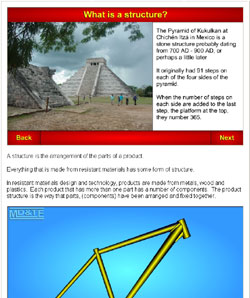
Introduction: what is a structure?
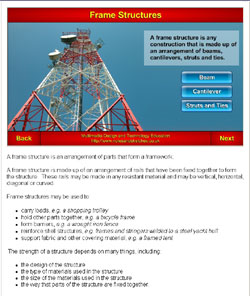
Frame structures
Shell structures
Combination of frame and shell structures
Stone structures
Brick and block structures
Concrete structures
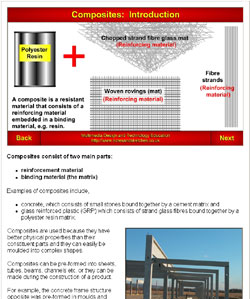
Composites
Loads
Forces:
compression
tension
torsion
shear
bending
Structural sections
Joints in wooden structures (16 wood joint animations)
Knock-down fittings
Joints in metal structures
welding
soldering and brazing
riveting
nuts, bolts, screws
Joints in plastic structures
Physical and chemical properties, and characteristics of materials used in structures
Support and reinforcement of structures
Equilibrium
Centre of gravity
Moments
Force diagrams
parallelogram of forces
triangle of forces
Testing structures
Interactive Exercises: exploring the qualities of structures / calculations / interpreting numeric information
Bridges
beam bridges
continuous span bridge
simple span bridge
cantilever span bridge
cantilever with suspended span bridge
Warren deck truss bridge
Warren (through)Truss
Pratt Truss (through truss)
Howe Truss (through truss)
Lattice Truss (through truss)
Plate girder bridge
Deck beam bridge
Orthotropic beam bridge
Rigid frame (inclined legs)
Rigid Frame (with V- legs)
Stone arch bridge
Open spandrel deck arch bridge
Spandrel braced arch bridge
Cantilever through truss bridge
Trussed deck arch bridge
Trussed through arch bridge
Ribbed arch bridge
Suspension bridge
Cable stayed bridge
Bridges: Newcastle bridges
Bridges: River Danube bridges from Vienna - Budapest
The package also includes:
Workshop safety rules
Workshop safety in detail
Risk assessment exercises
View a sample D&T exercises from the Structures Design and Technology software.
Animations are used throughout to
illustrate processes and principles.
The screen shots illustrate how animations are used on text pages to illustrate topics.
Detailed animations explain processes such as the hand lay-up of GRP.
Learning Objectives
Students will learn that:
there are various types of structures, including frame structures, shell structures, combination of frame and shell structures, and structures made from bricks, blocks, stone and composites
each structural type and each building material has its own specific technology
loads and other forces act on structures, including compression, tension, torsion, shear, bending forces
each material has specific chemical and physical properties
materials used to build structures can be reinforced and strengthened in various ways, including using structural sections and composites
equilibrium, moments, centre of gravity and force diagrams are used when designing structures
a safety factor is calculated into the design of structures
materials and components are fixed by temporary and permanent ways by:
electric arc welding
soldering and brazing
riveting
nuts and bolts
adhesives
solid timber is very absorbent at its ends
the end of solid timber has "end grain"
gluing to end grain results in a weak joint
the aim of a wood joint is to:
glue to the sides of timber whenever possible
include a mechanical joint
joints are designed for particular purposes
there are a range of standard joints that are adapted for specific purposes.
With regard to safety, students will learn:
safety rules
designer's safety responsibility
risk assessment
safety rules and defined procedures
hazard warnings and instructions
safe materials
safe storage of materials
tool safety
safety features on tools
safe working practices
safe working area
product safety
to write risk assessments.
Structures Design and Technology
Develops students' literacy
Develops students' knowledge of D&T and structures terminology
Develops students' knowledge of a broad range of structures design and technology theory
Learning resources are in HTML format for use with computers and whiteboards
Can be used for whole class teaching, can be used on an interactive whiteboard
Can be used for individual learning on computers, enables students to work at their own pace
Information is presented using a range of media including easily understood animations
Motivates students to learn and to achieve high scores
Supplied as msi installer software but can be supplied in a format suitable for Apple Macs. upon request
What does it cost?
Structures Design and Technology
Single User Licence £30
School Site Licence £60
Placing an order
To place an order for a Site Licence for a UK school or college, please click here then fill out the order form. The school will be sent the download information together with an invoice.
To place an order for a Single User Licence for a student who will use the software at home and pay for the software licence by PayPal or credit card, please click here.